Showing posts with label JDBC. Show all posts

Write a java program to create a table through frontend application?


import java.sql.*;
class CreateTable {
 public static void main(String[] args) {
   try {
    Class.forName("Sun.jdbc.odbc.JdbcOdbcDriver");
    System.out.println("DRIVERS LOADED...");
    Connection con = DriverManager.getConnection("jdbc:odbc:oradsn", "scott", "tiger");
    System.out.println("CONNECTION ESTABLISHED...");
    Statement st = con.createStatement();
    int i = st.executeUpdate("create table kalyan (eno number (4), ename varchar2 (15))");
    System.out.println("TABLE CREATED...");
    con.close();
   } catch (Exception e) {
    e.printStackTrace();
   }
  } // main
}  // CreateTable


Write a java program which illustrates the concept of Batch processing?


import java.sql.*;
class BatchProConcept {
 public static void main(String[] args) throws Exception {
   Class.forName("Sun.jdbc.odbc.JdbcOdbcDriver");
   System.out.println("DRIVERS LOADED...");
   Connection con = DriverManager.getConnection("jdbc:odbc:oradsn", "scott", "tiger");
   System.out.println("CONNECTION ESTABLISHED...");
   con.setAutoCommit(false);
   Statement st = con.createStatement();
   st.addBatch("insert into student values (3, 'j2ee')");
   st.addBatch("delete from student where sno=1");
   st.addBatch("update student set sname='java' where sno=2");
   int res[] = st.executeBatch();
   for (int i = 0; i < res.length; i++) {
    System.out.println("NUMBER OF ROWS EFFECTED : " + res[i]);
   }
   con.commit();
   con.rollback();
   con.close();
  } // main
}   // BatchProConcept


Write a java program which illustrates the concept of updatable ResultSet?


import java.sql.*;
class UpdateResultSet {
 public static void main(String[] args) {
   try {
    Class.forName("Sun.jdbc.odbc.JdbcOdbcDriver");
    System.out.println("DRIVERS LOADED...");
    Connection con = DriverManager.getConnection("jdbc:odbc:oradsn", "scott", "tiger");
    System.out.println("CONNECTION ESTABLISHED...");
    Statement st = con.createStatement(ResultSet.TYPE_SCROLL_SENSITIVE, ResultSet.CONCUR_UPDATABLE);
    ResultSet rs = st.executeQuery("select * from emp1");
    rs.next();
    rs.updateInt(2, 8000);
    rs.updateRow();
    System.out.println("1 ROW UPDATED...");
    rs.moveToInsertRow();
    rs.updateInt(1, 104);
    rs.updateInt(2, 2000);
    rs.insertRow();
    System.out.println("1 ROW INSERTED...");
    rs.absolute(2);
    rs.deleteRow();
    System.out.println("1 ROW DELETED...");
    con.close();
   } catch (Exception e) {
    e.printStackTrace();
   }
  } // main
}   // UpdateResultSet


Write a java program which illustrates the concept of scrollable ResultSet?


import java.sql.*;
class ScrollResultSet {
 public static void main(String[] args) {
   try {
    Class.forName("Sun.jdbc.odbc.JdbcOdbcDriver");
    System.out.println("DRIVERS LOADED...");
    Connection con = DriverManager.getConnection("jdbc:odbc:oradsn", "scott", "tiger");
    System.out.println("CONNECTION ESTABLISHED...");
    Statement st = con.createStatement(ResultSet.TYPE_SCROLL_INSENSITIVE, ResultSet.CONCUR_READ_ONLY);
    ResultSet rs = st.executeQuery("select * from emp");
    System.out.println("RECORDS IN THE TABLE...");
    while (rs.next()) {
     System.out.println(rs.getInt(1) + " " + rs.getString(2));
    }
    rs.first();
    System.out.println("FIRST RECORD...");
    System.out.println(rs.getInt(1) + " " + rs.getString(2));
    rs.absolute(3);
    System.out.println("THIRD RECORD...");
    System.out.println(rs.getInt(1) + " " + rs.getString(2));
    rs.last();
    System.out.println("LAST RECORD...");
    System.out.println(rs.getInt(1) + " " + rs.getString(2));
    rs.previous();
    rs.relative(-1);
    System.out.println("FIRST RECORD...");
    System.out.println(rs.getInt(1) + " " + rs.getString(2));
    con.close();
   } catch (Exception e) {
    System.out.println(e);
   }
  } // main
}; // ScrollResultSet


Write a java program which illustrates the concept of resource bundle file or how to develop a flexible jdbc application along with its metadata?


import java.sql.*;
import java.io.*;
import java.util.*;
class RBFConcept {
 public static void main(String[] args) {
   try {
    FileInputStream fis = new FileInputStream("rbfdb.prop");
    Properties p = new Properties();
    p.load(fis);
    String dname = (String) p.get("Dname");
    String url = (String) p.get("URL");
    String username = (String) p.get("Uname");
    String password = (String) p.get("Pwd");
    String tablename = (String) p.get("Tablename");
    // loading drivers and obtaining connection
    Class.forName(dname);
    System.out.println("DRIVERS LOADED...");
    Connection con = DriverManager.getConnection(url, username, password);
    System.out.println("CONNECTION CREATED...");
    // executing query
    Statement st = con.createStatement();
    ResultSet rs = st.executeQuery("select * from" + tablename);
    ResultSetMetaData rsmd = rs.getMetaData();
    // printing column names
    System.out.println("=================================");
    for (int i = 1; i <= rsmd.getColumnCount(); i++) {
     System.out.print(rsmd.getColumnName(i) + " ");
    }
    System.out.println("");
    System.out.println("=================================");
    // printing the data
    while (rs.next()) {
     for (int j = 1; j <= rsmd.getColumnCount(); j++) {
      System.out.print(rs.getString(j) + " ");
     }
    }
    con.close();
   } catch (Exception e) {
    e.printStackTrace();
   }
  } // main
}   // RSFConcept


Write a java program which points the data of a table along with its column names?


import java.sql.*;
class Table {
 public static void main(String[] args) {
   try {
    DriverManager.registerDriver(new Sun.jdbc.odbc.JdbcOdbcDriver());
    System.out.println("DRIVERS LOADED...");
    Connection con = DriverManager.getConnection("jdbc:odbc:oradsn", "scott", "tiger");
    System.out.println("CONNECTION ESTABLISHED...");
    Statement st = con.createStatement();
    ResultSet rs = st.executeQuery("select * from dept");
    ResultSetMetaData rsmd = rs.getMetaData();
    System.out.println("===========================================");
    // PRINTING COLUMN NAME
    for (int i = 1; i <= rsmd.getColumnCount(); i++) {
     System.out.print(rsmd.getColumnName(i) + " ");
    }
    System.out.println("");
    System.out.println("==========================================");
    // PRINTING THE DATA OF THE TABLE
    while (rs.next()) {
     for (int j = 1; j <= rsmd.getColumnCount(); j++) {
      System.out.print(rs.getString(j) + " ");
     }
     System.out.println("");
    }
    con.close();
   } catch (SQLException sqle) {
    sqle.printStackTrace();
   }
  } // main
}; // Table


Write a java program which illustrates the concept of DatabaseMetaData and ResultSetMetaData?


import java.sql.*;
class MetaData {
 public static void main(String[] args) {
   try {
    DriverManager.registerDriver(new Sun.jdbc.odbc.JdbcOdbcDriver());
    System.out.println("DRIVERS LOADED...");
    Connection con = DriverManager.getConnection("jdbc : odbc : oradsn", "scott", "tiger");
    System.out.println("CONNECTION ESTABLISHED...");
    // UNIVERSAL DATABASE DETAILS
    DatabaseMetaData dmd = con.getMetaData();
    System.out.println("DATABASE NAME : " + dmd.getDatabaseProductName());
    System.out.println("DATABASE VERSION : " + dmd.getDatabaseProductVersion());
    System.out.println("NAME OF THE DRIVER : " + dmd.getDriverName());
    System.out.println("VERSION OF THE DRIVER : " + dmd.getDriverVersion());
    System.out.println("MAJOR VERSION OF DRIVER : " + dmd.getDriverMajorVersion());
    System.out.println("MINOR VERSION OF DRIVER : " + dmd.getDriverMinorVersion());
    // USER DATABASE DETAILS
    Statement st = con.createStatement();
    ResultSet rs = st.executeQuery("select * from dept");
    ResultSetMetaData rsmd = rs.getMetaData();
    System.out.println("NUMBER OF COLUMNS : " + rsmd.getColumnCount());
    for (int i = 1; i <= rsmd.getColumnCount(); i++) {
     System.out.println("NAME OF THE COLUMN : " + rsmd.getColumnName(i));
     System.out.println("TYPE OF THE COLUMN : " + rsmd.getColumnType(i));
    }
    con.close();
   } catch (Exception e) {
    e.printStackTrace();
   }
  } // main
} // MetaData


Write a jdbc program to retrieve the data from excel?


import java.sql.*;
class XSelect {
 public static void main(String[] args) {
   try {
    DriverManager.registerDriver(new 
    Sun.jdbc.odbc.JdbcOdbcDriver());
    System.out.println("DRIVERS LOADED...");
    Connection con = DriverManager.getConnection("jdbc:odbc:xldsn");
    System.out.println("CONNECTION ESTABLISHED...");
    Statement st = con.createStatement();
    ResultSet rs = st.executeQuery("select * from [student$]");
    while (rs.next()) {
     System.out.println(rs.getString(1) + " " + rs.getString(2) + " " + rs.getString(3));
    }
    con.close();
   } catch (SQLException sqle) {
    sqle.printStackTrace();
   }
  } // main
} // XSelect


Write a java program which illustrates the concept of procedure?


create or replace procedure StuPro
(no in number, name in varchar2, loc1 out varchar2)
as
begin
select dname, loc into name, loc1 from dept
where deptno=no;
insert int abc values (no, name, loc1);
end;


import java.sql.*;

import java.io.*;
class ProConcept {
 public static void main(String[] args) {
   try {
    DriverManager.registerDriver(new oracle.jdbc.driver.OracleDriver());
    System.out.println("DRIVERS LOADED...");
    Connection con = DriverManager.getConnection("jdbc:oracle:thin:@localhost:1521:
     BudDinu ","scott ","tiger ");
     DataInputStream dis = new DataInputStream(System.in); 
     System.out.println("ENTER DEPARTMENT NUMBER : ");
     String s1 = dis.readLine(); 
     int n1 = Integer.parseInt(s1);
     CallableStatement cs = con.prepareCall("{call StuPro (?,?,?)}"); 
     cs.setInt(1, n1); 
     cs.registerOutParameter(2, Types.VARCHAR);
     cs.registerOutParameter(3, Types.VARCHAR); 
     cs.execute(); 
     String res = cs.getString(2); 
     String res1 = cs.getString(3); 
     System.out.println("DEPARTMENT NAME : " + res); 
     System.out.println("DEPARTMENT LOCATION : " + res1);
    } catch (Exception e) {
     System.out.println(e);
    }
   } // main
  } // ProConcept


Write a java program which illustrates the concept of function?


create or replace function StuFun(a in number, b in number, n1 out number) 
return number as n2 number;
begin
n1:=a*b;
n2:=a+b;
return (n2);
end;


import java.sql.*;

import java.io.*;
class FunConcept {
 public static void main(String[] args) {
   try {
    DriverManager.registerDriver(new 
    oracle.jdbc.driver.OracleDriver());
  System.out.println("DRIVERS LOADED...");
    Connection con = 
    DriverManager.getConnection("jdbc:oracle:thin:@localhost:1521:
     BudDinu " , "scott " , "tiger ");
     System.out.println("CONNECTION OBTAINED..."); 
     DataInputStream dis = new DataInputStream(System.in);
     System.out.println("ENTER FIRST NUMBER : "); 
     String s1 = dis.readLine();
     System.out.println("ENTER SECOND NUMBER : "); 
     String s2 = dis.readLine(); 
     int n1 = Integer.parseInt(s1);
     int n2 = Integer.parseInt(s2); 
     CallableStatement cs = con.prepareCall("{?=call ArthFun (?,?,?)}"); 
     cs.setInt(2, n1); 
     cs.setInt(3, n2);
     cs.registerOutParameter(1, Types.INTEGER); 
     cs.registerOutParameter(4, Types.INTEGER); 
     cs.execute();
     int res = cs.getInt(1);
     int res1 = cs.getInt(4); 
     System.out.println("SUM OF THE NUMBERS : " + res); 
     System.out.println("MULTIPLICATION OF THE NUMBERS : " + res1);
    } catch (Exception e) {
     e.printStackTrace();
    }
   } // main
  } // FunConcept


Write a java program to retrieve the records from a specified database by accepting input from keyboard?


import java.sql.*;
import java.io.*;
class SelectDataRun {
 public static void main(String[] args) {
   try {
    Class.forName("Sun.jdbc.odbc.JdbcOdbcDriver");
    System.out.println("DRIVERS LOADED...");
    Connection con = DriverManager.getConnection("jdbc:odbc:oradsn", "scott", "tiger");
    System.out.println("CONNECTION ESTABLISHED...");
    PreparedStatement ps = con.prepareStatement("select * from dept where deptno");
    DataInputStream dis = new DataInputStream(System.in);
    System.out.println("ENTER DEPARTMENT NUMBER : ");
    String s1 = dis.readLine();
    int dno = Integer.parseInt(s1);
    ps.setInt(1, dno);
    ResultSet rs = ps.executeQuery();
    while (rs.next()) {
     System.out.print(rs.getString(1) + " " + rs.getString(2) + " " + rs.getString(3));
    }
    con.close();
   } catch (Exception e) {
    e.printStackTrace();
   }
  } // main
}   // SelectDataRun


Write a java program to insert a record in dept database by accepting the data from keyboard at runtime using dynamic queries?


import java.sql.*;
import java.io.*;
class InsertRecRun {
 public static void main(String[] args) {
   try {
    DriverManager.registerDriver(new oracle.jdbc.driver.OracleDriver());
    System.out.println("DRIVERS LOADED...");
    Connection con =
    DriverManager.getConnection("jdbc:oracle:thin:@localhost:1521:
     BudDinu "," scott "," tiger ");
     System.out.println("CONNECTION OBTAINED..."); 
     PreparedStatement ps = con.prepareStatement("insert into dept values     
    (?,?,?)"); 
     DataInputStream dis = new DataInputStream(System.in);
     System.out.println("ENTER DEPARTMENT NUMBER : "); 
     String s1 = dis.readLine(); 
     int dno = Integer.parseInt(s1);
     System.out.println("ENTER DEPARTMENT NAME : "); 
     String dname = dis.readLine(); 
     System.out.println("ENTER LOCATION NAME : "); 
     String loc = dis.readLine(); ps.setInt(1, dno); 
     ps.setString(2, dname); 
     ps.setString(3, loc); 
     int i = ps.executeUpdate(); 
     System.out.println(i + "ROW(s) INSERTED...");
     con.close();
    } catch (Exception e) {
     e.printStackTrace();
    }
   } // main
  } // InsertRecRun


Write a java program to retrieve the data from emp database?


import java.sql.*;
class SelectData {
 public static void main(String[] args) throws Exception {
  DriverManager.registerDriver(new Sun.jdbc.odbc.JdbcOdbcDriver());
  System.out.println("DRIVERS LOADED...");
  Connection con = DriverManager.getConnection("jdbc:odbc:oradsn", "scott", "tiger");
  System.out.println("CONNECTION ESTABLISHED...");
  Statement st = con.createStatement();
  ResultSet rs = st.executeQuery("select * from dept");
  while (rs.next()) {
   System.out.println(rs.getString(1) + " " + rs.getString(2) + " " + rs.getString(3));
  }
  con.close();
 }
};


Write a jdbc program which will insert a record in the Student database?


import java.sql.*;
class InsertRec {
 public static void main(String[] args) {
  try {
   Driver d = new             Sun.jdbc.odbc.JdbcOdbcDriver();
   DriverManager.registerDriver(d);
   System.out.println("DRIVERS LOADED...");
   Connection con =       DriverManager.getConnection("jdbc:odbc:oradsn", "scott", "tiger");
   System.out.println("CONNECTION ESTABLISHED...");
   Statement st = con.createStatement();
   int i = st.executeUpdate("insert into student values (10,'suman',60.87);");
   System.out.println(i + " ROWS SELECTED...");
   con.close();
  } catch (Exception e) {
   System.out.println("DRIVER CLASS NOT FOUND...");
  }
 }
};


JDBC Interview Questions


1- What is JDBC?

Java JDBC is a java API to connect and execute query with the database. JDBC API uses jdbc drivers to connect with the database.


Why use JDBC- Before JDBC, ODBC API was the database API to connect and execute query with the database. But, ODBC API uses ODBC driver which is written in C language (i.e. platform dependent and unsecured). That is why Java has defined its own API (JDBC API) that uses JDBC drivers (written in Java language).

2- What is JDBC Driver?
JDBC Driver is a software component that enables java application to interact with the database.There are 4 types of JDBC drivers:
JDBC-ODBC bridge driver
Native-API driver (partially java driver)
Network Protocol driver (fully java driver)
Thin driver (fully java driver)

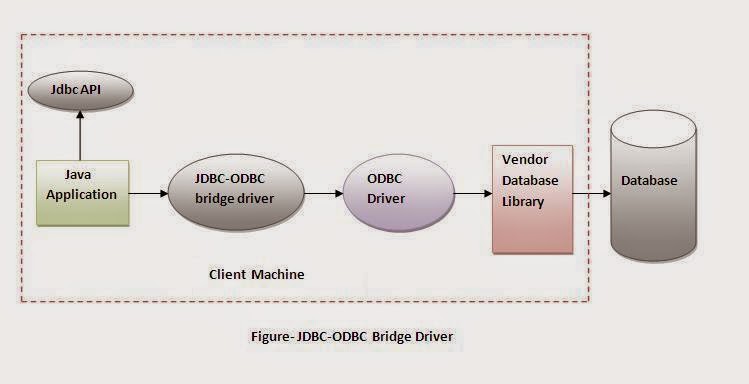
1) JDBC-ODBC bridge driver
The JDBC-ODBC bridge driver uses ODBC driver to connect to the database. The JDBC-ODBC bridge driver converts JDBC method calls into the ODBC function calls. This is now discouraged because of thin driver.


Advantages:
easy to use.
can be easily connected to any database.

Disadvantages:
Performance degraded because JDBC method call is converted into the ODBC function calls.
The ODBC driver needs to be installed on the client machine.

2) Native-API driver
The Native API driver uses the client-side libraries of the database. The driver converts JDBC method calls into native calls of the database API. It is not written entirely in java. 


Advantage:
performance upgraded than JDBC-ODBC bridge driver.

Disadvantage:
The Native driver needs to be installed on the each client machine.
The Vendor client library needs to be installed on client machine.

3) Network Protocol driver
The Network Protocol driver uses middleware (application server) that converts JDBC calls directly or indirectly into the vendor-specific database protocol. It is fully written in java.


Advantage:
No client side library is required because of application server that can perform many tasks like auditing, load balancing, logging etc.

Disadvantages:
Network support is required on client machine.
Requires database-specific coding to be done in the middle tier.
Maintenance of Network Protocol driver becomes costly because it requires database-specific coding to be done in the middle tier.

4) Thin driver
The thin driver converts JDBC calls directly into the vendor-specific database protocol. That is why it is known as thin driver. It is fully written in Java language.


Advantage:
Better performance than all other drivers.
No software is required at client side or server side.

Disadvantage:
Drivers depends on the Database.

3- What are the steps to connect to the database in java?
There are 5 steps to connect any java application with the database in java using JDBC. They are as follows:
Register the driver class
Creating connection
Creating statement
Executing queries
Closing connection

4- What are the JDBC API components?
The java.sql package contains interfaces and classes for JDBC API.

Interfaces:
Connection
Statement
PreparedStatement
ResultSet
ResultSetMetaData
DatabaseMetaData
CallableStatement etc.

Classes:
DriverManager
Blob
Clob
Types
SQLException etc.

5- What are the JDBC statements?
There are 3 JDBC statements.
Statement
PreparedStatement
CallableStatement

6- What is the difference between Statement and PreparedStatement interface?
In case of Statement, query is complied each time whereas in case of PreparedStatement, query is complied only once. So performance of PreparedStatement is better than Statement.

7- How can we execute stored procedures and functions?
By using Callable statement interface, we can execute procedures and functions.

8- What is the role of JDBC DriverManager class?
The DriverManager class manages the registered drivers. It can be used to register and unregister drivers. It provides factory method that returns the instance of Connection.

9- What does the JDBC Connection interface?
The Connection interface maintains a session with the database. It can be used for transaction management. It provides factory methods that returns the instance of Statement, PreparedStatement, CallableStatement and DatabaseMetaData.

10- What does the JDBC ResultSet interface?
The ResultSet object represents a row of a table. It can be used to change the cursor pointer and get the information from the database.

11- What does the JDBC ResultSetMetaData interface?
The ResultSetMetaData interface returns the information of table such as total number of columns, column name, column type etc.

12- What does the JDBC DatabaseMetaData interface?
The DatabaseMetaData interface returns the information of the database such as username, driver name, driver version, number of tables, number of views etc.

13- Which interface is responsible for transaction management in JDBC?
The Connection interface provides methods for transaction management such as commit(), rollback() etc.

14- What is batch processing and how to perform batch processing in JDBC?
By using batch processing technique in JDBC, we can execute multiple queries. It makes the performance fast.

15- How can we store and retrieve images from the database?
By using PreparedStatement interface, we can store and retrieve images.